Adjust Exercise Settings
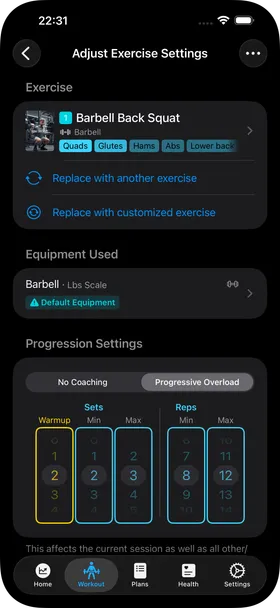
You can access this screen during a workout session by tapping the Adjust Exercise Settings button at the top of the Set List.
From here, you can replace the exercise with another or with a customized exercise (Quick Replace with Customized Exercise is a Premium Feature), change the equipment variant you are using, change the coaching mode, and configure the target numbers of warmup sets, work sets, and reps — or, in Set by Set mode, each set of the plan.
When your plan has the same exercise on several days (say Bench Press on Push A and Push B), PREV Reference chooses which earlier session counts as “last time”: Any Day, the most recent one whichever day it was (the default), or Same Day, the last time you did this plan day. It sets what the PREV column shows, the sets a new session starts with, and what the coach builds on — with or without coaching. Pick Same Day when the days train the exercise differently, such as a heavy day and a volume day. The choice applies to that exercise on every day of the plan, and you can also change it from the exercise’s detail screen in the plan.
For a Set by Set exercise, a Reference e1RM section at the bottom shows the estimated 1 rep max the workout’s percentage weights are based on, and lets you change it (Your reference e1RM).