Set-by-Set Programming
Also called: Powerlifting programming, Per-set programming
Set by Set is the third coaching mode, next to No Coaching and Prog. Overload (Progressive Overload). Instead of a range of sets and reps, every set of the exercise gets its own targets: its weight, its reps and its RPE, warmups included. This is how powerlifting programs and most RPE-based programs are written: a top set, back-off sets, a percentage of your max…
Anyone can program sets this way. The coaching messages during the workout are part of HeavyTrack Premium.
Turning it on
Section titled “Turning it on”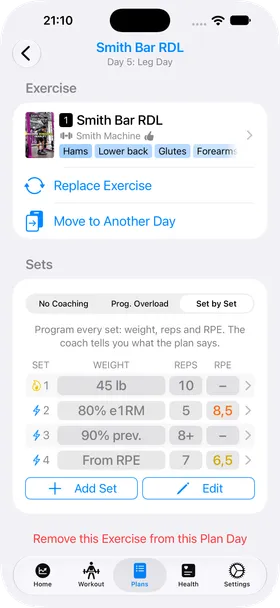
Open an exercise of your plan (or Adjust Exercise Settings during a workout) and pick Set by Set at the top of the Sets section.
The exercise’s current plan is written out set by set — its warmup sets, then its work sets with their reps — so you start from something familiar and adjust it.
The list reads like the sets of a workout: the set type icon and number, then the Weight, Reps and RPE each set aims for. A dash means the plan leaves it open.
- Add Set adds a copy of the last set — “5 × 5 at 75%” is one set and four taps.
- Edit shows a red minus on each set to remove it. You can also swipe a set to the left. A plan always keeps at least one set.
Programming a set
Section titled “Programming a set”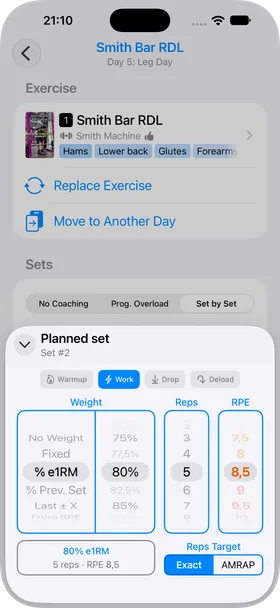
Tap a set to open its settings.
- Set type: Warmup, Work, Drop or Deload, as when you log a set.
- Weight: how the coach will work out the weight. Pick the method on the left wheel and its value on the right one (see the table below).
- Reps: the reps to do, or – to leave them open.
- RPE: the effort to aim for, in half steps from 6 to 10 (and 4 and 5 for easy sets), or – for none.
- Reps Target: Exact, or AMRAP (as many reps as possible). With AMRAP the reps you set are a minimum: 5+ means at least 5, then as many as you can.
The box at the bottom left recaps the set the way its row will show it.
| Weight | What the coach recommends |
|---|---|
| No Weight | Nothing: you choose the weight during the workout. |
| Fixed | That exact weight. |
| % e1RM | That percentage of your reference e1RM. |
| % Prev. Set | That percentage of the set just before it — typical for back-off sets after a top set. |
| Last ± X | The same set the last time you did this workout, plus (or minus) X. An increase is skipped when that set missed its target reps, so you repeat the weight instead. |
| From RPE | The weight that should give the target reps at the target RPE, worked out from your reference e1RM with the standard RPE chart. Needs both reps and an RPE. |
During the workout
Section titled “During the workout”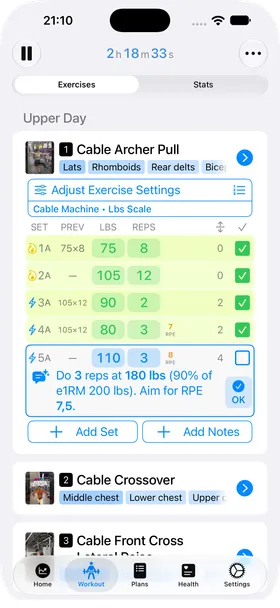
When the workout is created, the exercise gets exactly the sets you planned, in their order, with their target reps.
The coach then tells you what the plan says for the first set still to do — whatever its type, warmups included. The part in parentheses says where the weight comes from, so you can check the math:
- Do 3 reps at 180 lbs (90% of e1RM 200 lbs). Aim for RPE 7.5.
- Do at least 8 reps at 45 lbs (90% of previous set 50 lbs), as many as you can.
- Do 5 reps at 110 lbs (last time 105 lbs + 5 lbs).
- Do 5 reps at 105 lbs (last time 105 lbs, target reps missed).
Tap a bold value, or OK, to put the weight and reps in the set. The weight is rounded to what your equipment allows.
Without Premium, the advice is replaced by a button to unlock it.
Your reference e1RM
Section titled “Your reference e1RM”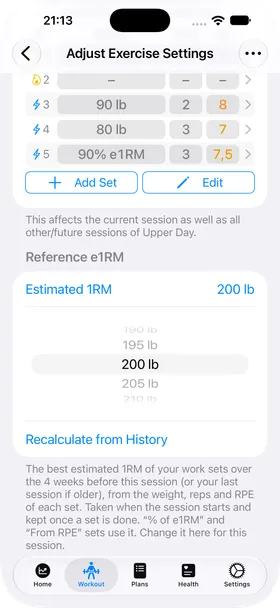
The % e1RM and From RPE weights are based on one number per exercise: its reference e1RM for this workout. You find it at the bottom of Adjust Exercise Settings, under Reference e1RM.
It is your best estimated 1 rep max from the work sets of the 4 weeks before this workout (or from your last workout of this exercise, if it is older). Each set counts the weight, the reps and how hard it was (RIR or RPE).
It is taken when you start the workout and stays put once you have completed a set of the exercise, so the weights of a workout never shift under you.
- Tap the value to change it for this workout with the wheel — for instance to use a training max rather than your estimate.
- Recalculate from History puts the calculated value back.
- With no history yet, it shows None yet: set it yourself and the percentage sets get their weights from your first workout.