Custom Exercises
Also called: customized exercise, user-added exercise, exercise variation
Custom exercises let you track a movement that is not in HeavyTrack’s built-in exercise library, or adapt an existing exercise to match the way you perform it.
You can create one from scratch by opening Settings → Exercises, tapping the + button, and filling in the exercise details. If a built-in exercise is already a close match, creating a variation is quicker and preserves its setup.
Create a variation of an existing exercise
Section titled “Create a variation of an existing exercise”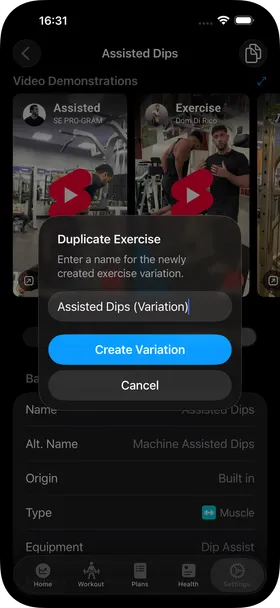
Direct creation
Section titled “Direct creation”- Open Settings → Exercises.
- Select the exercise that most closely matches the movement you want to add.
- Tap the duplicate button (the two overlapping pages) in the top-right corner.
- Enter a name that distinguishes your variation from the original.
- Tap Create Variation.
During a workout
Section titled “During a workout”You can also create an exercise variation during a workout, directly from the exercise you’re about to train.
HeavyTrack copies the original exercise’s description, properties, muscle involvement, and video demonstrations into a new, user-added exercise. Your personal notes and rating are not copied over.
Customize the new exercise
Section titled “Customize the new exercise”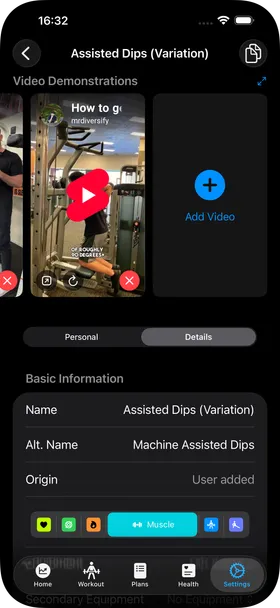
The new variation opens immediately. Select Details to review and edit its name, alternative name, exercise type, equipment, muscles, tracking options, and other characteristics.
Its Origin is shown as User added, which distinguishes it from the built-in exercise you copied. You can also add your own YouTube demonstration with Add Video, or remove a copied video that does not apply to your variation.
Find your custom exercises later
Section titled “Find your custom exercises later”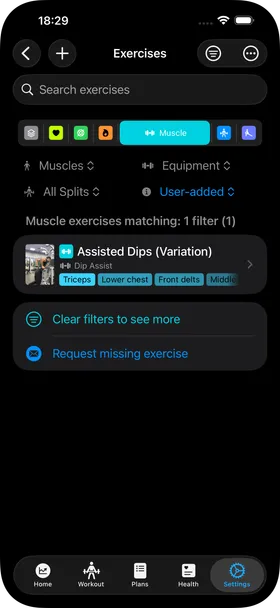
Return to Settings → Exercises and open the Origin filter. Choose User-added to show only exercises you created, including variations of built-in exercises.
Tap a result to edit it. Your custom exercises are also available anywhere you select an exercise for a plan or workout, just like built-in exercises.