Plans Tab
Also called: Programs tab
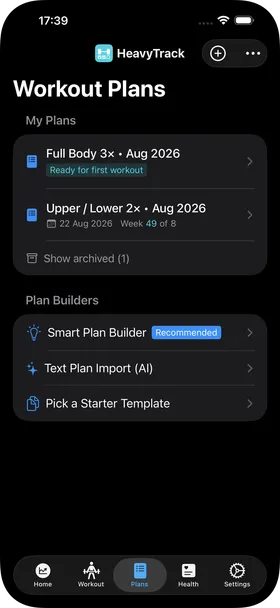
My Plans section
Section titled “My Plans section”This section shows all the workout plans you have created.
Note that it is possible to archive plans you no longer use, for clarity. Swipe right on a plan to archive it. Swipe right on an archived plan to make it active again.
You can also delete a plan by swiping left. A plan can only be deleted if none of its workout sessions contains a completed set. Empty or unstarted sessions do not prevent deletion. This protects your recorded training history.
Plan Builders section
Section titled “Plan Builders section”This section offers a selection of ways to build a new training plan for yourself:
- Smart Plan Builder — this is the most advanced option. It will ask you questions and use best-in-class coaching rules to create a personalized plan for you.
- Text Plan Import (AI) — use this if you have generated a workout plan in an LLM such as ChatGPT or Claude. Copy and paste the text of your plan there. Note that this uses Apple’s local foundation model to interpret what you paste, so your plan is processed on the device rather than sent to a cloud service. It requires iOS 26 or later, Apple Intelligence to be enabled, and an iPhone 15 Pro or Pro Max, any iPhone 16 or newer, or an iPad with an M1 chip or later.
- Pick a Starter Template — this allows you to quickly pick a cookie-cutter template that is not actually personalized to you. It is useful for quickly testing the app, but it’s not the preferred way to actually train.