Set List
Also called: Set Rows
A Set List, also called Set Rows, is the list of sets that you perform for a specific exercise during a specific workout session.
Depending on your layout settings, you can see the Set List within the Workout Session View as well as the Workout Exercise View.
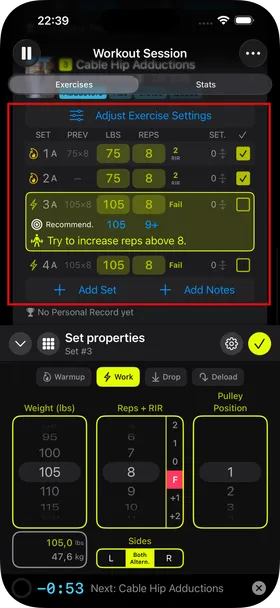
Main elements
Section titled “Main elements”- Adjust Exercise Settings — opens the Adjust Exercise Settings screen, where you can replace the exercise, change the equipment variant you are using, change the coaching mode, and more.
- One row per set — tap a row to edit it. Tap the checkbox on the right to mark the set complete or not complete. Swipe a row to the left to delete it.
- Add Set — adds another set at the position of the next not-yet-completed set, or at the end if every existing set is complete.
- Add Notes — adds notes for this exercise in the current session.
Optional information below the Set List
Section titled “Optional information below the Set List”Depending on the available information, you may also see:
- The notes you entered.
- Your Personal Records for this exercise in the current session.